The short version
No key, no account
The hosted servers from Exa and Parallel answered us with no key, and both can search and read pages. Firecrawl's keyless endpoint gives search, scrape and parse. The DuckDuckGo server runs on your machine and needs no key. Exa, Parallel, Firecrawl and DuckDuckGo all limit how many requests you can make.
Paying, or running it yourself
Paid searches cost $1 to $8 per 1,000 across Brave, Tavily, Exa, Firecrawl, Perplexity and Parallel. mcp-searxng with your own SearXNG instance runs the whole search on your own server, and it costs nothing but the server.
What a web search MCP server does
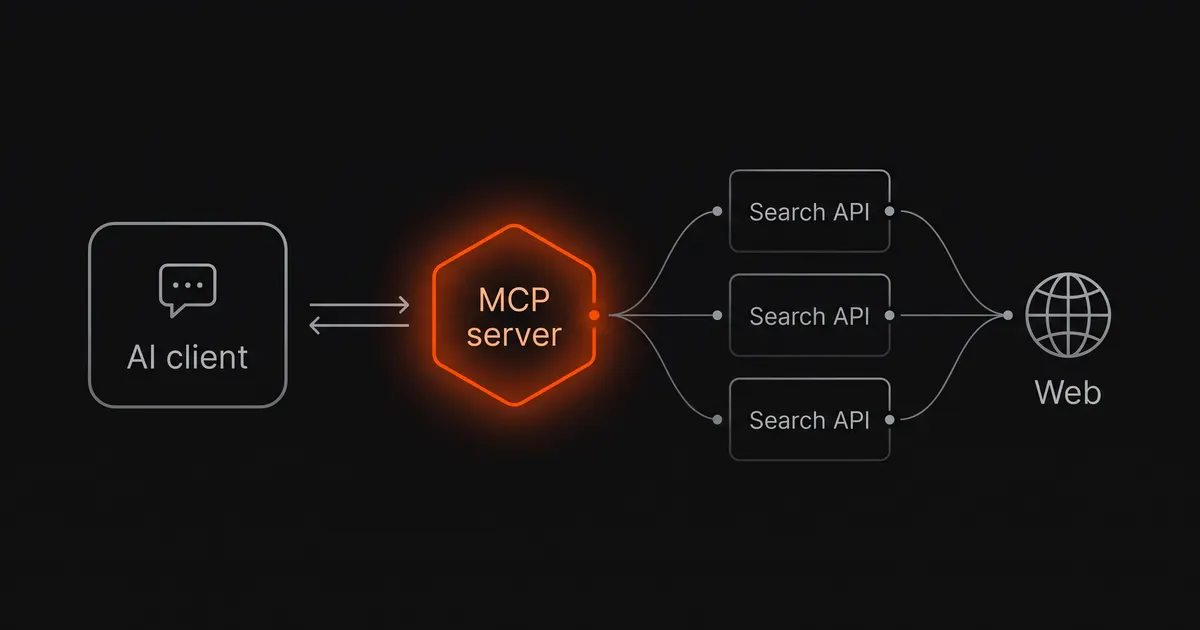
MCP, the Model Context Protocol, is how clients such as Claude Code, Claude Desktop and Cursor call outside tools. A web search MCP server describes a few tools to the model. When the model calls one, the server sends the request to a search API and returns the result as text. The server itself is a small program, and every one on this page with a public repository is MIT-licensed. The real choice is the search API behind it, because that sets the results, the price and whether you need an account.
Most servers offer two kinds of tool:
- Search takes a query and returns a list of results. Some return short snippets, and others return a large part of each page's text.
- Fetch (also called read, scrape or extract) takes a URL and returns that page as text or markdown. Without it, the model sees only what the search tool returned.
A hosted server is a URL you add to your client, with sign-in through OAuth or a key in a header. A local server is a package your client starts with npx or uvx, with the key in an environment variable. Some vendors offer both.
The eight servers side by side
Prices are list prices on 30 October 2026, for the plain search call with up to 10 results. The tool names come from each server's live tool list.
| Server | Search tool | Fetch tool | Without a key | Free allowance | Paid, per 1,000 searches |
|---|---|---|---|---|---|
| Brave | brave_web_search and 6 more | None | No | $5 credit a month | $5 |
| Tavily | tavily_search | tavily_extract | No (401) | 1,000 credits a month | $5–8 |
| Exa | web_search_exa | web_fetch_exa | Yes, rate-limited | $10 credit a month | $4–7 |
| Firecrawl | firecrawl_search | firecrawl_scrape | Yes: 3 tools | 1,000 credits a month | About $2–7.60 |
| Perplexity | perplexity_search | None | No (401) | None | $5, or $1 fast |
| Parallel | web_search | web_fetch | Yes, rate-limited | $5 credit a month | $1–5 |
| mcp-searxng | searxng_web_search | web_url_read | Yes | Your own server | $0 plus the server |
| DuckDuckGo | search | fetch_content | Yes | Free, rate-limited | No paid plan |
| Server | Repository | Hosted URL | Auth | Search backend self-hostable |
|---|---|---|---|---|
| Brave | brave/brave-search-mcp-server | None; run locally | BRAVE_API_KEY | No |
| Tavily | tavily-ai/tavily-mcp | mcp.tavily.com/mcp | Key in header or URL, or OAuth | No |
| Exa | exa-labs/exa-mcp-server | mcp.exa.ai/mcp | None, OAuth or key | No |
| Firecrawl | firecrawl/firecrawl-mcp-server | mcp.firecrawl.dev/v2/mcp | None, OAuth or key | Yes, Firecrawl engine (AGPL-3.0) |
| Perplexity | perplexityai/modelcontextprotocol | api.perplexity.ai/mcp | Key or OAuth | No |
| Parallel | Not stated in its docs | search.parallel.ai/mcp | None, key or OAuth | No |
| mcp-searxng | ihor-sokoliuk/mcp-searxng | None; run locally | None | Yes, SearXNG (AGPL-3.0) |
| DuckDuckGo | nickclyde/duckduckgo-mcp-server | None; run locally | None | No; it reads DuckDuckGo's pages |
A basic Tavily search costs one credit. A credit costs $0.008 pay-as-you-go and $0.005 on the Growth plan, which gives the $5–8 range in the first table. Firecrawl charges 2 credits per 10 search results, which is about $2 per 1,000 searches on the Standard plan and $7.60 on Hobby.
Brave Search MCP
Brave's official server is the npm package @brave/brave-search-mcp-server. Version 2.1.4 lists eight tools: web, news, image, video, local and place search, a summarizer, and brave_llm_context, which returns text already extracted from the pages that match a query. Brave runs its own search index, so the results do not come from Google or Bing.
There is no URL fetch tool, so the model can read only what a search returns. For a known page, pair Brave with a server that has a fetch tool. All eight tool descriptions are sent to the model, and the BRAVE_MCP_ENABLED_TOOLS variable limits the list to the ones you use.
The Search plan costs $5 per 1,000 requests and includes $5 of credit each month, about 1,000 searches. Many older guides still install @modelcontextprotocol/server-brave-search. That package is deprecated on npm, and its code sits in the archived MCP servers repository.
Tavily MCP
Tavily is a search API built for AI agents. Its server has five tools: tavily_search, tavily_extract, tavily_crawl, tavily_map and tavily_research. Some comparison pages write the names with hyphens, such as tavily-search. The current server uses underscores.
The hosted server at mcp.tavily.com/mcp returned HTTP 401 to our request without a key. It takes a key in an Authorization: Bearer header or in the URL, or you can sign in with OAuth. The free plan gives 1,000 credits a month. These tools use credits at different rates:
- A basic search costs 1 credit and an advanced search costs 2.
- Extract costs 1 credit per five pages read.
- Research costs 4 to 250 credits a request, depending on the model and the work, so a few research calls can use a large part of the free month.
Exa MCP
Exa runs its own index, built for searching by meaning rather than exact keywords. The hosted server at mcp.exa.ai/mcp works without a key at a lower rate limit, and it answered our requests that way. It shows two tools by default: web_search_exa, which returns each result with text from the page, and web_fetch_exa, which reads URLs. Adding ?tools= to the URL turns on web_search_advanced_exa and agent_run, and agent_run needs a sign-in or key.
web_fetch_exa returns at most 3,000 characters per page unless the model sets maxCharacters. On a long documentation page, the model gets only the first part of the page. Exa's API costs $7 per 1,000 searches with the Auto and Fast search types, $4 with Instant, and $1 per 1,000 pages for page text. Every account gets $10 of free credit each month. Exa's pricing page does not say how calls to the keyless server are billed or limited.
Firecrawl MCP
Firecrawl's hosted server has three endpoints:
https://mcp.firecrawl.dev/v2/mcpwith no key gives three tools:firecrawl_search,firecrawl_scrapeandfirecrawl_parse, within daily limits.- The same URL with an API key in a bearer header, or
/v2/mcp-oauthwith a sign-in, gives the full set. Our local copy of version 3.36.0 listed 28 tools, including crawl, map, an agent, browser interaction and page monitoring. /v2/mcp-searchis a search-only endpoint with nine tools.
Firecrawl's search tool returns ranked results with excerpts, and it can scrape each result in the same call. A search costs 2 credits per 10 results, and each scraped page costs 1 credit. The free plan gives 1,000 credits a month. A firecrawl_search_feedback tool refunds 1 credit per search when the model reports which results it used.
Firecrawl is the only vendor here whose engine you can run yourself. The engine is AGPL-3.0, and the MCP server talks to your copy when you set FIRECRAWL_API_URL. The self-hosted engine is a smaller product, as our Firecrawl alternatives page explains, and its search falls back to SearXNG or DuckDuckGo. Fireplexity, the open-source answer engine this site covers, uses the same Firecrawl search API.
Perplexity MCP
Only one of the four tools on Perplexity's server returns search results. The other three return a written answer with citations:
perplexity_searchcalls the Search API, which costs $5 per 1,000 requests, or $1 with fast search.perplexity_askcalls the Agent API with thefastpreset.perplexity_reasonuses themediumpreset.perplexity_researchuses thehighpreset, and a run can take minutes.
The three answer tools are billed by token at Agent API rates. Older versions of the server called the Sonar models, and the current version calls the Agent API instead. Perplexity has no free API tier, and the hosted server at api.perplexity.ai/mcp returned 401 without a key. OAuth sign-in works only for an admin of a Perplexity API organization that can pay for usage. An answer with citations still needs checking, and our page on AI search citation accuracy shows how.
Parallel Search MCP
Parallel's docs say its Search MCP is free to use with no key. The anonymous server at search.parallel.ai/mcp runs searches in fast mode and caps each tool call at about 25,000 characters of excerpts. It has two tools: web_search, which takes an objective and a list of queries, and web_fetch, which reads URLs. A key in a bearer header raises the rate limits, and /mcp-oauth is the sign-in endpoint.
On the API, a search with 10 results costs $1 per 1,000 at the Turbo and Fast settings and $5 at Basic and Advanced. Each account gets $5 of free credit a month. Parallel's own comparison article gives the server address as mcp.parallel.ai/mcp. We tested only the address in its docs, search.parallel.ai/mcp.
SearXNG: mcp-searxng
SearXNG is an open-source metasearch engine. It sends your query to engines such as Google, Bing and DuckDuckGo and merges the results. The mcp-searxng server (version 2.9.0, Node.js 22 or later) connects an MCP client to a SearXNG instance through the SEARXNG_URL variable. It has four tools: searxng_web_search, searxng_search_suggestions, searxng_instance_info and web_url_read.
The server does not install SearXNG. You run SearXNG yourself, or use an instance you trust, and a public instance sees every query. Two SearXNG settings block MCP servers until you change them:
- JSON output is off by default, so API requests return 403 until you enable the
jsonformat. - The limiter allows each IP only four JSON requests an hour.
Our SearXNG Docker guide covers both settings and the pass_ip fix, with tests. The search engines behind SearXNG can also block a busy instance, and our self-hosting guide covers that problem.
The top Google result for “web search mcp server” is a different server: mrkrsl/web-search-mcp. It needs no key and opens Bing, Brave and DuckDuckGo in Playwright browsers on your machine. Its README says it was tested with LM Studio and LibreChat only, and its last commit was in August 2025.
DuckDuckGo MCP
duckduckgo-mcp-server is a Python server that you start with uvx duckduckgo-mcp-server. It has three tools: search, fetch_content and expand_link. It needs no key because it reads DuckDuckGo's HTML results page rather than an API. DuckDuckGo now blocks the server's default HTTP client by its TLS fingerprint. The server then retries with a client that imitates Chrome, which needs the optional [browser] extra installed. Our test search with the default install worked on 30 October 2026.
What we tested
On 30 October 2026 we connected to each server with plain MCP requests (initialize, then tools/list) and recorded the tools it reported. The tool names in this page's tables come from those lists:
- Exa, Firecrawl and Parallel answered on their hosted URLs with no key.
- Tavily and Perplexity returned HTTP 401 on their hosted URLs without a key.
- We started the Brave, Tavily, Perplexity and Firecrawl npm packages locally with a placeholder key and read their tool lists. The servers report tools before they check the key.
- mcp-searxng installed and listed its tools. We did not connect it to a SearXNG instance for this test.
- The DuckDuckGo server installed with
uvxand completed a search.
We then sent one search, how does the searxng limiter treat json api requests, to the servers that work without a key. All four servers returned the SearXNG limiter documentation as its first or second result. They differed in how much text they returned, which matters because all of it goes into the model's context:
| Server | 5 results | 10 results | Time, 10 results |
|---|---|---|---|
Parallel web_search | — | 27,672 | 1.0 s |
Exa web_search_exa | 13,376 | 20,795 | 2.4 s |
Firecrawl firecrawl_search | 7,247 | 17,015 | 4.3 s |
DuckDuckGo search | 2,146 | — | — |
A token is about four characters of English text. Parallel's 10 results came to roughly 7,000 tokens, and DuckDuckGo's five came to about 500, because DuckDuckGo returns titles and one-line snippets only. Parallel's search tool has no setting for the number of results, so we have no 5-result figure for it.
We also asked each fetch tool to read the SearXNG limiter page:
- Exa
web_fetch_exa: 3,113 characters, cut off by its 3,000-character default. - Firecrawl
firecrawl_scrape, main content only: 8,355 characters. - Parallel
web_fetchwithfull_content: 13,870 characters.
This was one query, so treat the numbers as a rough guide to output size, not a test of result quality.
How to add one to Claude Code, Claude Desktop and Cursor
Claude Code
Hosted servers use --transport http. Local servers go after --, with keys passed by --env. Put the server name before --env, because Claude Code reads a name placed after it as another variable.
# hosted, no key
$ claude mcp add --transport http exa https://mcp.exa.ai/mcp
$ claude mcp add --transport http firecrawl https://mcp.firecrawl.dev/v2/mcp

# hosted, key in a header
$ claude mcp add --transport http tavily https://mcp.tavily.com/mcp \
    --header "Authorization: Bearer tvly-YOUR_KEY"

# local
$ claude mcp add brave-search --env BRAVE_API_KEY=YOUR_KEY \
    -- npx -y @brave/brave-search-mcp-server
$ claude mcp add searxng --env SEARXNG_URL=http://localhost:8080 \
    -- npx -y mcp-searxng
Servers added this way load in the current project only. Add --scope user to load one in every project, or --scope project to save it in the project's .mcp.json for your team.
Claude Desktop
Claude Desktop starts local servers from claude_desktop_config.json. Open it from Settings, then Developer, then Edit Config. The file is at ~/Library/Application Support/Claude/ on macOS and %APPDATA%\Claude\ on Windows. Restart the app after you save it.
{
  "mcpServers": {
    "brave-search": {
      "command": "npx",
      "args": ["-y", "@brave/brave-search-mcp-server"],
      "env": { "BRAVE_API_KEY": "YOUR_KEY" }
    },
    "searxng": {
      "command": "npx",
      "args": ["-y", "mcp-searxng"],
      "env": { "SEARXNG_URL": "http://localhost:8080" }
    }
  }
}
Brave's README adds --transport http to this example. Leave it out: version 2 of the server uses stdio by default, and stdio is how Claude Desktop talks to a server it starts. Hosted servers go in a different place. Open Settings, then Connectors, choose Add custom connector and paste the server URL. Servers that support OAuth then ask you to sign in.
Cursor
Cursor reads ~/.cursor/mcp.json for every project and .cursor/mcp.json for one project. Hosted servers take a url and optional headers, and local servers take command, args and env:
{
  "mcpServers": {
    "exa": { "url": "https://mcp.exa.ai/mcp" },
    "perplexity": {
      "url": "https://api.perplexity.ai/mcp",
      "headers": { "Authorization": "Bearer YOUR_KEY" }
    },
    "ddg-search": {
      "command": "uvx",
      "args": ["duckduckgo-mcp-server"]
    }
  }
}
Which one to pick
Free, no signup
- Exa or Parallel hosted: search and fetch with no key.
- Firecrawl keyless: search, scrape and parse.
- DuckDuckGo: local, snippets only, less reliable.
Coding agents that read docs
- Choose a server with a fetch tool: Exa, Firecrawl, Parallel or Tavily.
- Raise Exa's
maxCharactersfor long pages. - Brave and Perplexity need a second server to read a URL.
Cheapest paid search
- Parallel Fast or Turbo: $1 per 1,000.
- Perplexity fast search: $1 per 1,000.
- Firecrawl Standard: about $2 per 1,000.
Own infrastructure
- mcp-searxng with your own SearXNG instance.
- Firecrawl's MCP server pointed at a self-hosted engine.
If you want a written answer with citations rather than a list of results, Perplexity's perplexity_ask and perplexity_reason tools do that, at token prices.
A smaller tool list also helps, because every tool description takes up context before the model does anything. Exa's default server has two tools, and Firecrawl's keyless endpoint has three. Brave's list can be cut with BRAVE_MCP_ENABLED_TOOLS. Firecrawl's full server has 28.
Common questions
What is a web search MCP server?
It is a small program that gives an MCP client, such as Claude Code, Claude Desktop or Cursor, tools to search the web and usually to read a page. When the model calls a tool, the server sends the request to a search API and returns the result as text. The search API behind it decides the results, the price and whether you need an account.
Which web search MCP server is free?
The hosted servers from Exa and Parallel work with no key at a lower rate limit, and Firecrawl's keyless endpoint gives search, scrape and parse. The DuckDuckGo server runs locally with no key, and mcp-searxng is free if you run your own SearXNG. Brave and Tavily need a key but include a monthly free allowance, and Perplexity has no free tier.
Is the Brave Search MCP server free?
The server is free and MIT-licensed, but it needs a Brave Search API key. The Search plan includes $5 of credit a month, about 1,000 searches, then costs $5 per 1,000. Use the package @brave/brave-search-mcp-server; the older @modelcontextprotocol/server-brave-search is deprecated.
How do I add a web search MCP server to Claude Code?
For a hosted server, run claude mcp add --transport http with a name and the server URL, for example claude mcp add --transport http exa https://mcp.exa.ai/mcp. For a local server, put the name first, then --env with the key, then -- and the npx command. Add --scope user to use it in every project.
Can I self-host a web search MCP server?
Every MCP server on this page except Parallel's has MIT-licensed code you can run on your own machine, but most still send queries to a vendor's API. mcp-searxng is the exception: it searches through a SearXNG instance you run yourself. Firecrawl's server can also point at a self-hosted Firecrawl engine, which is AGPL-3.0.
What is the difference between a search tool and a fetch tool?
A search tool takes a query and returns a list of results, with snippets or page text. A fetch tool takes a URL and returns that page as text or markdown. Brave and Perplexity have no fetch tool, so the model can read only what their searches return.
Sources
- brave/brave-search-mcp-server — tools, environment variables, transports, Claude Desktop config; Brave Search API pricing — Search plan price and monthly credit
- tavily-ai/tavily-mcp — hosted URL, key and OAuth options; Tavily API credits — free credits, plan prices, credit cost per tool
- exa-labs/exa-mcp-server — default and optional tools, anonymous use, auth; Exa pricing — search and contents prices, free credit
- firecrawl/firecrawl-mcp-server — keyless, OAuth and search-only endpoints, search feedback refunds,
FIRECRAWL_API_URL; Firecrawl pricing — plans and credit costs; firecrawl/firecrawl — AGPL-3.0 engine - perplexityai/modelcontextprotocol and Perplexity MCP docs — tools, the API behind each, OAuth; Perplexity pricing — Search API price
- Parallel Search MCP — endpoints, tools, free anonymous use; Parallel pricing — Search API prices and free credit
- ihor-sokoliuk/mcp-searxng — tools,
SEARXNG_URL, Node.js requirement; searxng/searxng — AGPL-3.0; SearXNG limiter - nickclyde/duckduckgo-mcp-server — tools, backends and the TLS-fingerprint block; mrkrsl/web-search-mcp — engines and tested clients
- @modelcontextprotocol/server-brave-search on npm and modelcontextprotocol/servers-archived — the deprecated Brave package
- Claude Code: connect to MCP servers —
claude mcp addsyntax,--envorder, scopes - Connect to local MCP servers and connect to remote MCP servers — Claude Desktop config file and custom connectors
- Cursor: Model Context Protocol —
mcp.jsonlocations and format
Tool lists, prices and free allowances were checked on 30 October 2026 and change often. The output-size test used one query on one day. Brave's pricing page did not load from our network, so its figures come from Brave's API documentation as indexed by search engines; check the Brave dashboard before you budget. This site is an independent community page and is not affiliated with any company named here.